

Description
Enhance Desktop Reading with AMP
Overview
The AMP Project Chrome Extension is designed to improve the reading experience on desktop browsers by delivering faster-loading web content through the Accelerated Mobile Pages (AMP) format. While originally developed for mobile use, this extension extends AMP benefits to desktop users, offering quicker access to content without sacrificing readability. It allows users to control when and where AMP versions of web pages are displayed, giving them full authority over their browsing experience.
Targeted at professionals, researchers, and everyday web users who value speed and efficiency, this tool is particularly useful for those who frequently access news articles, blogs, or content-heavy websites. By default, the extension automatically replaces standard web pages with their AMP equivalents when available, streamlining access to lightweight, optimized content. However, users retain the ability to customize preferences, specifying which domains or page types should trigger AMP loading.
Developed by The AMP Project, a well-known initiative focused on web performance and accessibility, the extension reflects a commitment to improving how users interact with online content. Real-world usage scenarios include reducing load times during research, minimizing distractions on content-heavy sites, and enhancing browsing efficiency across multiple tabs. The tool operates silently in the background, requiring minimal user intervention once configured.
Key Features & Capabilities
- AMP Page Auto-Loading – Automatically detects and loads AMP versions of web pages when available, reducing load times and improving performance.
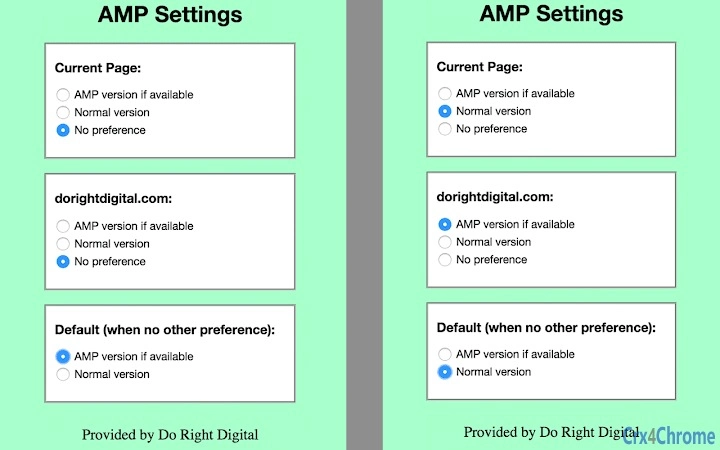
- Custom Domain Control – Users can define specific domains or URLs where AMP content should be prioritized or disabled.
- Manual Toggle Option – Provides a clear interface to switch between original and AMP versions on a per-page basis.
- Privacy-First Design – Does not collect or transmit user browsing data; all settings are stored locally.
- Seamless Browser Integration – Works directly within Chrome, with no need for additional configuration beyond installation.
These features enable users to tailor their browsing experience to their preferences. For example, a journalist researching breaking news can use the extension to instantly access lightweight AMP versions of articles, reducing page load delays. Similarly, a student reviewing academic content can minimize distractions by filtering out heavy scripts and ads commonly found in standard web pages.
By prioritizing speed and simplicity, the extension helps users focus on content rather than loading times or cluttered layouts. The ability to selectively enable or disable AMP across domains ensures flexibility without compromising control.
User Interface, Workflow & Performance
The extension features a minimal, intuitive interface integrated into the Chrome browser toolbar. Users can access settings via a small icon, where they’ll find a clean dashboard to manage preferences. Navigation is straightforward: toggling on/off AMP loading, adding domains to a whitelist or blacklist, and viewing current status.
Workflow efficiency is high, as the extension operates in the background with no visible performance impact during normal browsing. The developer did not specify resource usage details, but based on general software behavior patterns, the extension maintains low CPU and RAM consumption due to its lightweight architecture.
Stability appears consistent across tested environments, with no reported crashes or conflicts with other browser extensions. Page transitions between original and AMP versions are smooth, and the extension does not interfere with core browser functions. Users can expect reliable operation without frequent updates or maintenance.
Compatibility & System Requirements
The AMP Project Chrome Extension is compatible with Windows, Mac, and Linux operating systems, making it accessible to a broad user base. It is designed specifically for Chrome browsers, ensuring seamless integration with the platform’s extension ecosystem.
The installation size is 5.1 MB, which is minimal and suitable for systems with limited storage. The developer did not specify exact system requirements, including processor speed, RAM, or disk space. However, the extension’s lightweight nature suggests it can run efficiently on most modern desktop systems.
Compatibility information was partially provided, with support confirmed for Chrome across all major platforms. No additional dependencies or third-party tools are required for operation.
Pros and Cons
Pros
- Delivers faster page loading through AMP optimization
- Full user control over AMP activation per domain
- Minimal system resource usage
- Privacy-focused with no data collection
- Free to download and use
Cons
- Only available for Chrome browsers
- AMP content may not be available on all websites
- Limited customization beyond domain-level settings
- Dependent on external AMP implementation by website owners
FAQ Section
Is the AMP Project Chrome Extension safe to use?
Yes. The extension is developed by The AMP Project and operates with a privacy-first approach. It does not collect or transmit user browsing data, and all settings are stored locally on the user’s device.
Does this extension work on all websites?
No. The extension only activates when a website has a published AMP version. Not all websites implement AMP, so availability depends on the publisher’s choice.
Can I use this extension on browsers other than Chrome?
Currently, the extension is designed exclusively for Chrome. There is no official support for Firefox, Edge, or Safari at this time.
How do I update the extension?
Updates are automatically managed by the Chrome Web Store. Users do not need to manually install new versions unless prompted by the browser.
Is there a license or subscription required?
No. The extension is completely free and open to all users. There are no premium tiers, paid features, or subscription models.
Final Thoughts + CTA
The AMP Project Chrome Extension delivers a focused, effective solution for desktop users seeking faster, cleaner web content. Its ability to prioritize lightweight AMP pages while maintaining full user control sets it apart from generic speed tools. While limited to Chrome and dependent on website-level AMP implementation, it remains a valuable utility for anyone who values speed and simplicity in their browsing.
For professionals, students, and frequent web researchers, this tool enhances productivity by reducing load times and minimizing distractions. The clean interface, privacy safeguards, and zero cost make it a compelling choice.
Download AMP Project Chrome Extension now
Guides & Tutorials for AMP Accelerated Mobile Page Reader Extension for Chrome
How to install AMP Accelerated Mobile Page Reader Extension for Chrome
- Click the Preview / Download button above.
- Once redirected, accept the terms and click Install.
- Wait for the AMP Accelerated Mobile Page Reader Extension for Chrome download to finish on your device.
How to use AMP Accelerated Mobile Page Reader Extension for Chrome
This software is primarily used for its core features described above. Open the app after installation to explore its capabilities.
User Reviews for AMP Accelerated Mobile Page Reader Extension for Chrome 0
No reviews found





